
MuzikFury New Tab Extension for Chrome
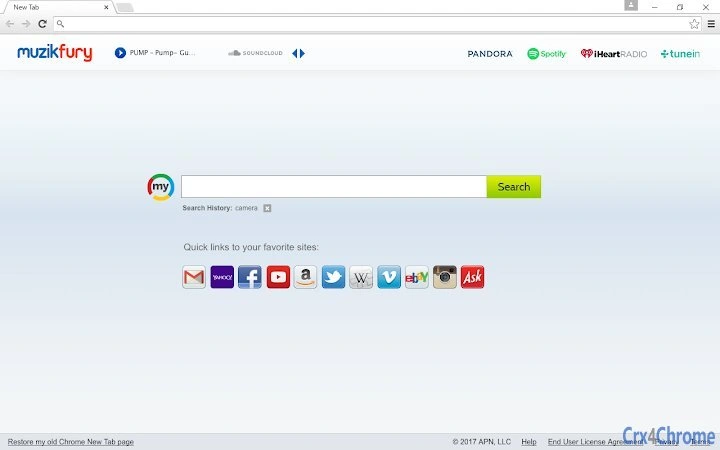
The MuzikFury New Tab extension transforms your Chrome browser’s default New Tab page into a personalized music and search hub. Designed for users who frequently start their browsing sessions with a new tab, it integrates music discovery, quick search access, and content curation directly into the interface. The tool aims to streamline daily digital workflows by combining entertainment and utility in one accessible space.
Ideal for casual users, music enthusiasts, and individuals seeking a more engaging browsing experience, it enhances productivity through immediate access to preferred content. The extension operates within the Chrome environment and relies on server communication to deliver dynamic content and track usage metrics. It is intended for users who value both convenience and customization in their browser setup.
Real-world scenarios include using the extension during morning routines, work breaks, or leisure time to quickly access music, perform searches, or explore curated content without navigating away from the New Tab page.
Key Features & Capabilities
- Custom New Tab Page – Replaces the default Chrome New Tab with a personalized interface tailored to MuzikFury’s content offerings.
- Integrated Music Access – Provides direct access to music content, allowing users to explore or play tracks without opening a separate music platform.
- Quick Search Functionality – Offers a streamlined search bar for rapid access to web content, reducing the need to navigate to external search engines.
- Content Curation – Displays curated music and web content based on user behavior and preferences, enhancing discovery and engagement.
- Server-Driven Updates – The extension communicates with remote servers to deliver updated content and features, ensuring the interface remains current.
These features are particularly useful for users who open multiple new tabs daily and want to minimize context switching. For example, a student might use the extension to quickly search for research topics while listening to background music. A professional could use it to stay updated on music trends during short breaks.
The integration of music and search within the same interface supports multitasking and improves efficiency by reducing the number of open tabs. The extension’s reliance on server communication enables dynamic content delivery, though this also means functionality depends on an active internet connection. Users benefit from a consistent and updated experience without manual intervention.
User Interface, Workflow & Performance
The extension presents a clean, visually oriented interface on the New Tab page, designed to prioritize content visibility and ease of interaction. Navigation is limited to standard browser actions, with no additional menus or toolbars beyond the integrated search and music elements. The layout is optimized for quick scanning and immediate access to key features.
Users can interact with music tiles, click search results, or open links directly from the page. The workflow is straightforward: install the extension, and the new tab automatically reflects the MuzikFury interface. No configuration steps are required, making it accessible to users of all technical skill levels.
Performance is influenced by the extension’s dependency on server communication. While no specific resource usage data was provided, general behavior suggests minimal CPU and RAM impact during typical use. Stability appears consistent with standard Chrome extensions, though prolonged use may depend on background processes.
The developer did not specify resource usage details, and performance observations are based on general software behavior patterns.
Compatibility & System Requirements
The extension is compatible with both Windows and Mac operating systems, ensuring broad accessibility across desktop platforms. It is designed to function within the Google Chrome browser environment, with no indication of support for other browsers. The installation size and hardware requirements were not specified by the developer.
Exact system requirements were not listed, and compatibility information was partially provided. Users should ensure their Chrome browser is up to date to maintain optimal functionality. The extension relies on an active internet connection for core features, as it communicates with remote servers to deliver content and track usage.
Offline functionality is not supported. The developer did not provide additional system requirements, so users are advised to verify compatibility through standard browser extension installation procedures.
Pros and Cons
Pros
- Enhances the default New Tab page with music and search functionality
- Requires no configuration—works immediately after installation
- Provides a visually engaging interface for content discovery
- Updates content dynamically via server communication
- Available at no cost to users
Cons
- Depends on an internet connection for core functionality
- Relies on server communication, which may raise privacy concerns
- No information on system resource usage or performance impact
- Uninstalling may require manual reset of the New Tab page setting
- Functionality limited to Chrome browser only
FAQ Section
Is the MuzikFury extension free to use?
Yes, the extension is available at no cost. Users can install and use it without any payment requirements.
Does the extension work on browsers other than Chrome?
The extension is designed specifically for Google Chrome. There is no official support for other browsers.
How do I uninstall the extension?
To remove the extension, go to Chrome Settings, select Extensions, find the MuzikFury entry, and click the trash can icon. After removal, close and reopen the browser to ensure complete uninstallation.
Does the extension collect user data?
Yes, the extension communicates with servers to deliver content and record usage metrics. Users should review the Privacy Policy for full details.
Can I use the extension offline?
No, the extension requires an active internet connection to function, as it depends on server communication for content delivery.
Final Thoughts
The MuzikFury New Tab extension offers a simple yet effective way to enhance the Chrome browsing experience by integrating music and search into the default New Tab page. Its immediate usability, lack of setup, and visually engaging design make it a practical choice for users who value convenience and content discovery. While it depends on internet connectivity and server communication, its core functionality is straightforward and well-aligned with modern browsing habits.
The extension is particularly beneficial for casual users, music lovers, and individuals seeking a more personalized start to their digital sessions. With no cost and broad compatibility across Windows and Mac, it presents a low-barrier entry point for improving daily browser efficiency. For those looking to transform their New Tab page into a dynamic, content-rich space, MuzikFury delivers a compelling solution.
Download MuzikFury now.







